
커뮤니티
재문의드립니다.

2023-04-03 18:22:08
1831
글번호 167874
첨부 이미지
그림1
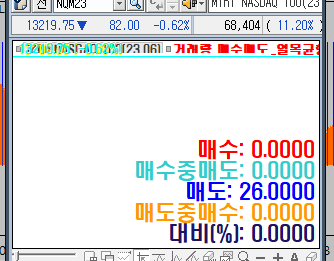
81538 제문의입니다.
첨부파일 처럼 숫자가 보이도록 부탁드립니다.
숫자 크기변경 가능 하도록 부탁드립니다.
- 1. 168658_ScreenShot_20230403181506.png (0.01 MB)
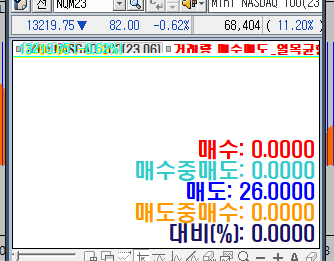
답변 1

예스스탁 예스스탁 답변
2023-04-04 10:06:32
안녕하세요
예스스탁입니다.
그리드로 적용영역 우측 하단에 표시되게 작성해 드립니다.
input : 조정1(23.6),조정2(38.2),조정3(60.0),조정4(61.8),조정5(78.4);
input : 글자크기(12);
var : a1(0),a2(0),a3(0),b1(0),b2(0),b3(0),Grid(0);
value1=(high-close)/(high-low);
Value2=(close-low)/(high-low);
var1 = iff((high+low)/2<=close,volume,0);
var2 = iff((high+low)/2<=close,volume*value1,0);
var3 = iff((high+low)/2>close,volume,0);
Var4 = iff((high+low)/2>close,volume*Value2,0);
a1=iff((high+low)/2<=close,volume,0);
a2=(high-close)/(high-low);
a3=iff((high+low)/2<=close,volume*a2,0);
b1=iff((high+low)/2>close,volume,0);
b2=(close-low)/(high-low);
b3=iff((high+low)/2>close,volume*b2,0);
Var5 = iff(a1>0,(a3/a1)*100,iff(b1>0,(b3/b1)*100,0));
Plot1(var1);
Plot2(Var2);
Plot3(Var3);
Plot4(Var4);
Plot5(Var5);
if Index == 0 Then
Grid = Grid_New(7, 2, 5,White, Gray, 1, Gray, 0);
if LastBarOnChart == 1 Then
{
Grid_Cell(Grid,0,0,"수식1",0,0,BLACK,White);
Grid_Cell(Grid,1,0,NumToStr(var1,2),0,0,BLACK,White);
Grid_CellSetTextSize(Grid,0,0,글자크기);
Grid_CellSetTextSize(Grid,1,0,글자크기);
Grid_Cell(Grid,0,1,"수식2",0,0,BLACK,White);
Grid_Cell(Grid,1,1,NumToStr(var2,2),0,0,BLACK,White);
Grid_CellSetTextSize(Grid,0,1,글자크기);
Grid_CellSetTextSize(Grid,1,1,글자크기);
Grid_Cell(Grid,0,2,"수식3",0,0,BLACK,White);
Grid_Cell(Grid,1,2,NumToStr(var3,2),0,0,BLACK,White);
Grid_CellSetTextSize(Grid,0,2,글자크기);
Grid_CellSetTextSize(Grid,1,2,글자크기);
Grid_Cell(Grid,0,3,"수식4",0,0,BLACK,White);
Grid_Cell(Grid,1,3,NumToStr(var4,2),0,0,BLACK,White);
Grid_CellSetTextSize(Grid,0,3,글자크기);
Grid_CellSetTextSize(Grid,1,3,글자크기);
Grid_Cell(Grid,0,4,"수식5",0,0,BLACK,White);
Grid_Cell(Grid,1,4,NumToStr(var5,2),0,0,BLACK,White);
Grid_CellSetTextSize(Grid,0,4,글자크기);
Grid_CellSetTextSize(Grid,1,4,글자크기);
}
즐거운 하루되세요
> 렉스턴 님이 쓴 글입니다.
> 제목 : 재문의드립니다.
> 81538 제문의입니다.
첨부파일 처럼 숫자가 보이도록 부탁드립니다.
숫자 크기변경 가능 하도록 부탁드립니다.